
New Drag-to-set TP/SL Feature on Candlestick Chart


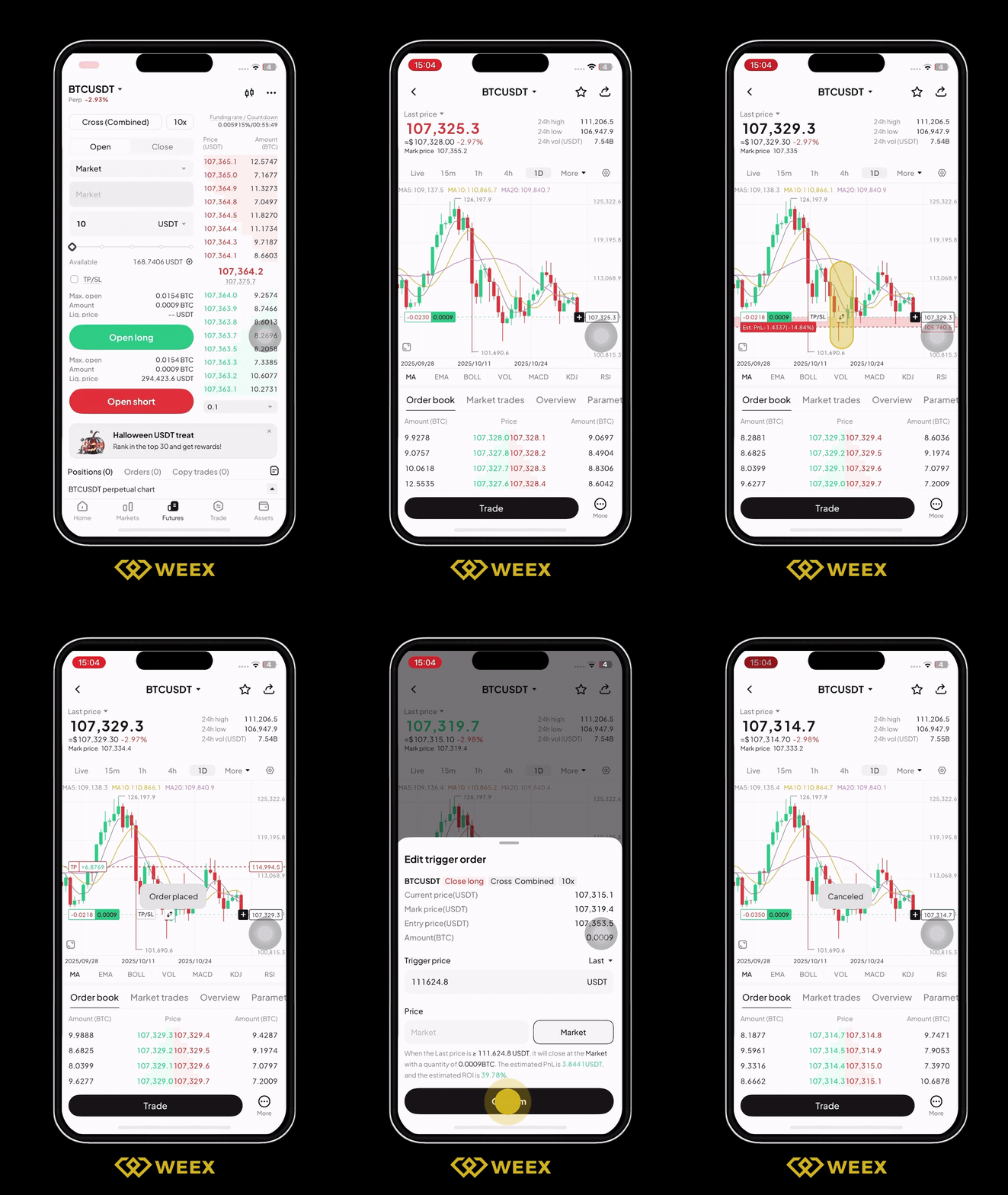
To help you optimize your strategies, the WEEX app now supports the drag-to-set feature for placing TP and SL orders directly on the candlestick chart. With this update, you can easily set TP/SL right on the chart, making trade adjustments more intuitive and seamless.
Highlights
1. Intuitive chart-based control
- Drag to set: Adjust your TP/SL levels directly on the candlestick chart with a simple drag.
- Real-time price: See the price as you drag—what you see is what you get.
- Clear display: Once set, your TP and SL levels are displayed as distinct lines on the chart, giving you a clear view of your trading positions at a glance.
2. Flexible adjustments
- Dynamic modification: Drag and adjust existing TP/SL lines freely—your order parameters update in real-time.
- Live PnL feedback: See projected PnL and percentage changes in real time while dragging, helping you quickly assess risk and return.
3. Multi-scenario support
- Futures trading: You can set TP/SL for both long and short positions in futures trading, for better risk management when using high leverage. Note: Currently available in combined margin mode only.
4. Smart interaction and refined experience
- Quick cancel: Simply use the delete icon next to the TP/SL line to cancel your orders.
- Precise input: In addition to drag-to-set, you can also enter exact prices manually for precision, tailored to different trading preferences.
5. All-platform support
- iOS and Android: Enjoy the same seamless experience across both platforms.
- Full market coverage: Use this feature on all futures trading pairs.
How to use
- Open the WEEX app and go to the trading page of any futures pair.
- Use the candlestick chart to view real-time market movements.
- Open the position panel, then long-press the TP or SL line and drag it to your target price.
- As you drag, both the price and the projected PnL will update in real time.
- Confirm the TP or SL line position and save your settings.
Use cases
- Lock your profits: When in profit, set a reasonable take-profit level to secure your gains and protect them from sudden market swings.
- Control risks: During high market volatility, use stop-loss to limit potential losses and safeguard your funds.
- Adjust strategies dynamically: Flexibly modify TP/SL levels based on market movements to optimize your trading strategy.
Feature preview
- Drag TP/SL lines: Long-press the TP or SL line on the candlestick chart, then drag it to your target price to set or adjust your levels.
- Real-time PnL: See the projected PnL amount and percentage instantly while dragging, helping you make quicker decisions.
- Quick cancel: Use the "X" icon next to the TP/SL line to remove your settings instantly.
Try now
Update your WEEX app to the latest version to experience our new drag-to-set TP/SL feature on candlestick chart! Gain clarity and transparency in your trades, empowering smarter investment decision!
You may also like

Morning Report | Vitalik outlines Ethereum's long-term roadmap, Lean Ethereum will become the third major iteration; SK Hynix seeks to attract more AI investors by listing in the U.S
The impact of OUSD on Circle, Tether, and Paxos: not a single negative factor, but a more complex reshaping of competition
Li Feifei's latest long article: When video generation, robots, and NVIDIA all claim to be world models, we need a taxonomy
Blaming the desolation of the cryptocurrency world on the rise of AI is a form of intellectual laziness
Strategy Founder: The Next 10 Years of Bitcoin
Forbes Special Report: Stablecoin cross-border payments are faster now, but not cheaper yet
A valuation of 8 billion dollars, doubling in 8 months! What makes the crypto-friendly bank Erebor Bank stand out?
340 billion valuation: Li Yanhong's largest IPO, a seat in Kunlunxin's shares is hard to come by
Stablecoins are the "royalists" of the crypto world: Open USD brings the old currency system into play
Cape Verde 2-3 Argentina: The Underdog Team That Stunned the World in Defeat
Cape Verde's run ended in a 3-2 defeat to Argentina, but their journey — three unbeaten draws, one heroic goalkeeper, and a fight that pushed the defending champions to the brink — is the kind of story markets recognize too: small caps can rattle blue chips long before anyone expects it.
Semiconductor stocks plummet, yet Anthropic wants to create a 2nm chip
Where is Zhao Changpeng's billion-dollar investment going? YZi Labs' investment landscape fully revealed
Ethereum Foundation Report: A Basic Guide to Ethereum for Governments and Financial Institutions
A pre-announced harvesting case: After the cryptocurrency price dropped by 99%, the public chain Saga exited to transform into AI
When American giants collectively "defect" from Chinese AI models
BIS Report Compliance Observation: The Real Risks of Stablecoins, Not Just "Depegging"
Portugal 2-1 Croatia: Ronaldo's 20-Year Knockout-Stage Drought Ends With a Debt Finally Collected
Portugal beat Croatia 2-1 in the 2026 global football championship's knockout rounds as Ronaldo scored his first-ever knockout-stage goal, Gonçalo Ramos struck a stoppage-time winner, and VAR ruled out a late equalizer for offside.
Bitcoin Price Prediction July 2026: Will BTC Recover to $70K or Drop Below $55K?
Morning Report | Vitalik outlines Ethereum's long-term roadmap, Lean Ethereum will become the third major iteration; SK Hynix seeks to attract more AI investors by listing in the U.S
The impact of OUSD on Circle, Tether, and Paxos: not a single negative factor, but a more complex reshaping of competition
Li Feifei's latest long article: When video generation, robots, and NVIDIA all claim to be world models, we need a taxonomy
Blaming the desolation of the cryptocurrency world on the rise of AI is a form of intellectual laziness
Strategy Founder: The Next 10 Years of Bitcoin
Forbes Special Report: Stablecoin cross-border payments are faster now, but not cheaper yet